Bulk SMS Docs
Introduction
This documentation exposes the functionality of Vomule API service to third party systems interested in sending SMS via this service. The service accepts connections via HTTP on a standard SSL/TLS port, with ReSTful API. All responses are JSON formatted.
Vomule API provides an easy and secure way to send SMS locally and abroad. Your needs to verify your clients, via OTP, or providing secure access to your applications via 2FA, are met here. To get started sending messages, please proceed to the next section. At this moment, only API-based messaging is available. Portal SMSing will be available very soon.
Getting Started
To start sending SMS,
you need to have an account. Register if you do not have an account.
After successful registration, login to your account,
go to My Applications
and create an application. There can only be one application under each category. To register, click
on add new application button. Select SMS for category, then enter sender ID if any. If you already have
an application with no sender name, you can't have another.
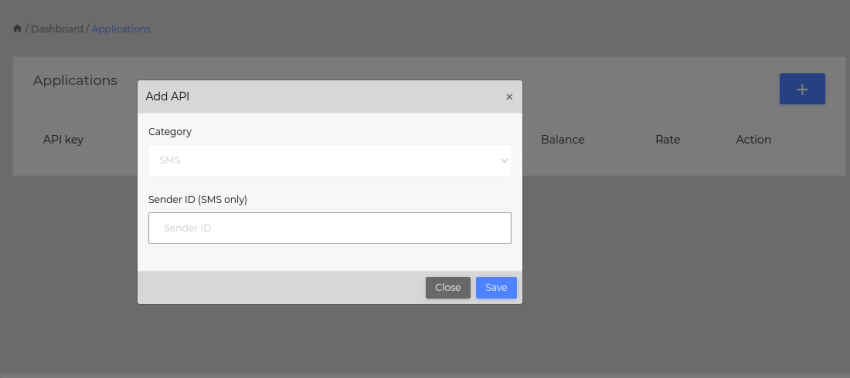 Adding an application
Sending SMS
When your API has been created and accepted, you can start sending messages. Use your API key to send messages. If it still
says "Pending" under status, contact support to have it Active. All applications are created pending by default,
for security reasons.
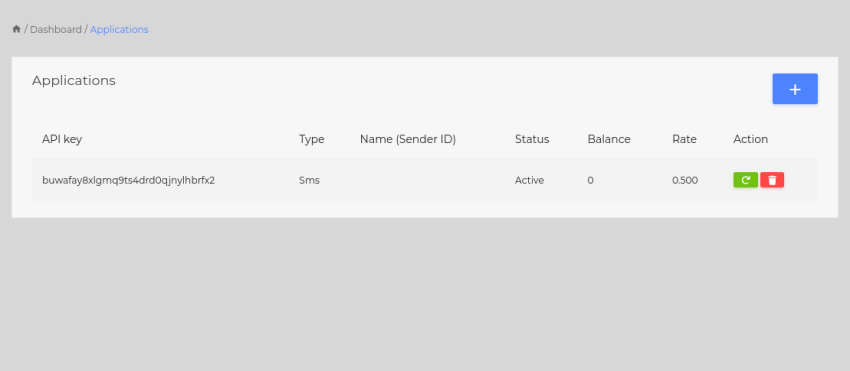 API key
API url is https://api.vomule.net. Your full url should look like https://api.vomule.net/sms/send/APIKEY?number=12345678&message=Hello+world
Single SMS
API parameters
- number- the destination contact number. All Lesotho numbers are to be written without a code. Lesotho numbers written with country code may yield unexpected results.
- message- the UTF encoded text to the destination. A page is 160 characters long.
- requestid- the optional request id for your use in querying the data later.
With the above parameters correct, the SMS should be delivered, and you get the response back
Response parameters
- code- the response code. Please see below for all response codes.
- text- the response text paired with code
- balance- the current balance after sending a message.
- transid- the transaction id for this message. Each message has its own unique transaction id.
Example
https://api.vomule.net/sms/send/APIKEY?number=12345678&message=Hello+world
Response
{
    "code": 200,
    "message": "Successfully sent",
    "balance": ,
    "transid": jkjybiyHBUy7TGB77UjhfJRTrcgap07uFuk
}
The API allows you to send bulk message, sending the contacts and message all at once. When you send a bulk SMS, you message is accepted and queued. Your application does not have to wait for all messages to be sent. Since the messages are sent in background process, your application returns instantly. Like other messages, bulk messages can be retrieved from API reports. The sections below provide details for sending bulk messages
Bulk SMS ~ One to One new
Applies to sending a unique message to each number. A basic CSV file is used, with number and message separated by a comma.
12345678,The is a sample message to 12345678
22222222,This is another message to 22222222
Note the new line for each new number and message pairs. Text in each line should be UTF-8 encoded. Do not provide headings.
API parameters
- bulksms- the file containing numbers and messages. All Lesotho numbers are to be written without a code. Lesotho numbers written with country code may yield unexpected results.
- requestid- the optional request id for your use in querying the data later.
As soon as the file is received, and in correct order, success response is sent back and the connection is closed
Response parameters
- code- the response code. Please see below for all response codes.
- text- the response text paired with code
Example
Your request is sent as POST request with bulksms parameter holding the file
Request
POST https://www.api.vomule.net/sms/bulk/APIKEY?bulksms=path/to/data.csv
Response
{
    "code": 200,
    "message": "Successfully sent",
}
Bulk SMS ~ One to Many new
Applies to sending a common message to all numbers. A basic text file is used, with numbers separated by a new line.
12345678
22222222
Note the new line for each new number. Do NOT add commas, as this will be considered part of number. Do not provide headings.
API parameters
- numbers- the file containing numbers. All Lesotho numbers are to be written without a code. Lesotho numbers written with country code may yield unexpected results.
- message- the UTF-8 encoded text message to be sent to all numbers.
- requestid- the optional request id for your use in querying the data later.
As soon as the file is received, and in correct order, success response is sent back and the connection is closed
Response parameters
- code- the response code. Please see below for all response codes.
- text- the response text paired with code
Example
Your request is sent as POST request with numbers and message parameters. numbers parameter holds the file
Request
POST https://www.api.vomule.net/sms/bulk/APIKEY?numbers=path/to/numbers.txt&message=text message
Response
{
    "code": 200,
    "message": "Successfully sent",
}
Response Codes
This section covers in details the response codes to expect when using this service.
| Code | Code name | Meaning |
|---|---|---|
| 200 | SUCCESS | Action performed successfully |
| 500 | General errors, most of which are undocumented and/or dynamic | |
| 501 | ERR_INSUFFICIENT_FUNDS | You do not have enough funds to perform this action |
| 502 | API_PENDING | Application is still pending |
| 503 | API_SUSPENDED | Application has been suspended |
| 504 | API_INVALID | API key cannot be found |
| 505 | API_NOT_APPLICABLE | Attempting to use an application which is NOT applicable to the service, such as trying to send SMS with electricity API |
Things to note
Following are important things to note and take care of as you use our API. Vomule will not take responsibility over any misbehaviour or unexpected outcomes resulting from NOT following the spec.
- Sender names can only be used after getting accepted. Attempting to use pending sender name will cause an error. It is not guaranteed that your sender name will be accepted. Sometimes sender names may be rejected. Details of rejection will be given you when this happens.
- Sender names are a minimum of 1 and a maximum of 11 characters long. No spaces, no special characters, only alphanumeric characters.
- A sender name is associated with your application. Using the application's API key will automatically use the sender name
- All Lesotho numbers should be written without a code. Writing Lesotho numbers with a code may yield unexpected results.
- All international numbers require a code.
- Cost for all international messages is higher
- If the local (Lesotho) number is written with more/less than 8 digits, it is charged as international number
- Failed messages are not charged. However, if they fail due to network error or handset unavailability, there's no refund
- SMS page size is 160 characters. Anything more that increases number of pages.
- Delivery to destinations may take up to 48 hours, or fail permanently if route to destination cannot be fully created.
- Actions performed on your applications that affect the balance are irreversible.
- The protection of your API your responsibility. Vomule has already done much to help you protect it. Vomule will not take responsibility over use of your API by any entity other than yourself.
- Do not share your API keys with anyone. With them they can do everything you can do
- If you think that your API key might have been leaked, you can easily change it from your applications
- Changing the API key will revoked all other registered devices from accessing the application
- The money you pay for the service is non-refundable
- When making a deposit, please use the first 6 digits of your API key as reference.